


articles/Review/gps-page4
GPS – Finding your way to that perfect landscape location - part 4 of 1 2 3 4 5 6 7 8 9 10 11 12 13 14 15 16
by Mike McNamee Published 01/02/2017
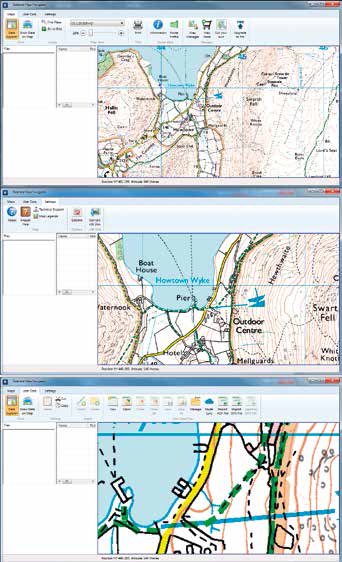
Before we even became initiated in the dark arts of ANT+, we searched Google with terms such as 'GPS for Cyclists'. We chose cycling rather than walking on the hunch that getting to some of the places we have visited is better by bike – you can cover more ground, the wheels take some of the weight, you can hide a bike behind a hedge with comparative ease and, when cycling, you can stop almost anywhere to take a look at the view and its photographic possibilities (an added bonus in your editor's case is that all hills are walked up thus giving even more time to absorb the ambience of the surroundings!). It proved almost impossible to wheedle out any useful information and overall the quest was grindingly slow.
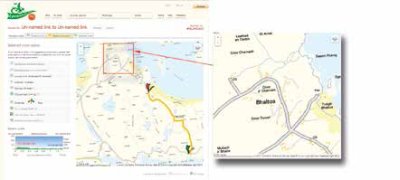
We gained the impression early on that two key pieces of software were BikeHike and BikeRouteToaster:
http://bikehike.co.uk
http://bikeroutetoaster.com/
Sadly, neither worked correctly, indeed Toaster did not work at all, returning an error as soon as an attempt to plot a route was made.
BikeHike has a superb interface but the application resolutely refused to auto-plot a route for us. After a couple of weeks we stumbled on a forum comment that there were 'click allocation' issues from OS who limit how many attempts can be made on their server (it is provided free of charge after all).
We tested BikeHike on a Windows 7 machine with three different web browsers (Firefox, Internet Explorer and Google Chrome), we tested two iMacs on different OS systems, two iPads and one iPhone 5.
BikeHike worked correctly (ie it auto-plotted a route) on an old iPad and an iPhone 5, but nothing else.
There is a subscription version of OS maps available and the 'Premium' level gives path finding for the National Parks (like route finding, but on recognised paths). Previously we had had a bad experience with OS and declined to renew our subscription last year. One of the problems we had with OS was in relation to the iPhone download, available also when you purchase a paper copy of a map. We tried this on Mull but it only worked twice in two weeks and in each instance for just a couple of miles on a main road. The remainder of the time there was no phone signal and the map refused to load – a complete waste of time. The other issue we had with our OS sub was that the printing interface from PDF was appalling.
Please Note:
There is more than one page for this Article.
You are currently on page 4
- GPS – Finding your way to that perfect landscape location page 1
- GPS – Finding your way to that perfect landscape location page 2
- GPS – Finding your way to that perfect landscape location page 3
- GPS – Finding your way to that perfect landscape location page 4
- GPS – Finding your way to that perfect landscape location page 5
- GPS – Finding your way to that perfect landscape location page 6
- GPS – Finding your way to that perfect landscape location page 7
- GPS – Finding your way to that perfect landscape location page 8
- GPS – Finding your way to that perfect landscape location page 9
- GPS – Finding your way to that perfect landscape location page 10
- GPS – Finding your way to that perfect landscape location page 11
- GPS – Finding your way to that perfect landscape location page 12
- GPS – Finding your way to that perfect landscape location page 13
- GPS – Finding your way to that perfect landscape location page 14
- GPS – Finding your way to that perfect landscape location page 15
- GPS – Finding your way to that perfect landscape location page 16
1st Published 01/02/2017
last update 21/07/2022 08:49:43
More Review Articles

SITTP Right Col Banner Max 200 pix wide Control Panel 1.7
Error:
Error:Can't verify file locking - aborting.Make sure the following has been observed: Unix Servers:
Software |
Header Banner root pages
Right Column Banner root pages - ACTIVE
Sponsor Banner root pages
 Expires: Mon, 26 Jul 2001 05:00:00 GMT
Pragma: no-cache
Cache-Control: no-cache, must-revalidate
Content-type: text/html
SITTP Right Col Banner Max 200 pix wide Control Panel 1.7
Error:
Error:Can't verify file locking - aborting.Make sure the following has been observed: Unix Servers:
Software |
Header Banner root pages
Right Column Banner root pages - ACTIVE
Sponsor Banner root pages
SITTP Right Col Banner Max 200 pix wide Control Panel 1.7
Error:
Error:Can't verify lock file for cleanup - aborting.Make sure the following has been observed: Unix Servers:
Software |
Header Banner root pages
Right Column Banner root pages - ACTIVE
Sponsor Banner root pages
