
World we live in Photography Competition - 2nd Place

View all entries click here: "World we live in" Image Competition

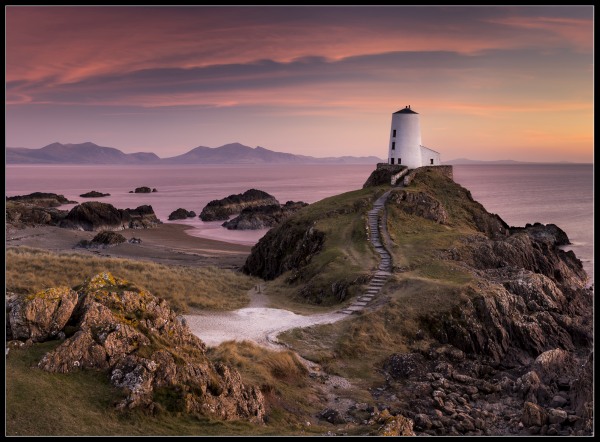
Congratulations to Carl Jones with this image.

Carl gives us an insight into how he captured the image.

Location:- Llanddwyn Island, Newborough, Anglesey, North Wales.

Time:- 6:30pm on 14/03/2016.

Camera, setting and technique:- Nikon D600, with 24-70mm Nikkor lense @ 35mm. Giottos tripod and ball head.

ISO 100, 6 Sec at f/13.

''ND Graduated Filter (can't remember the strength, although its probably a 0.9 as this is what I use more often than not).

I can't be positive, as I usually take the polariser off for Pano's, but I'm pretty sure I had it on for this photo, and this would explain how I managed a 6 second exposure.

The photo is a stitch panorama which I cropped down to this more attractive composition. I think the original Pano was 6 portrait orientation photographs, but I cropped a fair amount off for this final image.

The sky was looking promising when I arrived, and to the right of the photograph, at sunset, the sky was on fire. And even to the left the sky was colourful, whilst the sky behind the lighthouse was featureless and bland. Then for a minute, the high clouds picked up a faint pinkness. Thankfully the camera with a 6 second exposure could see more of the pink than the naked eye.

The photograph hasn't been overly photoshopped, the highlights taken out of the sky was enough to reveal the pink, which was also reflected in the sea, not apparent at the time of shooting. Looking at the unedited RAW image, which look very washed out, its fair to say I 'exposed to the right', to capture details in the shadow, and keep noise levels down.''

  • World we live in Photography Competition

1st Place see HERE
2nd Place see HERE
3rd Place see HERE
Highly Commended images see HERE
Page 1 - Page 2 - Page 3 -



SITTP Sponsor Banner Control Panel 1.7

SITTP Sponsor Banner Control Panel 1.7

Error:


Script Error

Error:

Can't verify file locking - aborting.

Make sure the following has been observed:

Unix Servers:
  • sponsorban.cgi is writable by this script
  • If a file locking problem, make sure the directory this script resides in is writable. Note, the directory does not have to be writable for the script to write to files, only for it to create files. File creation is required for proper file locking.
Windows NT systems:
  • sponsorban.cgi must be writable and accessible by the script
  • banner.cgi must be able to write to files and create files
  • On some NT systems, the variable near the top of banner.cgi must be set. It is currently set as follows:
      $main::sponsorban_path = "sponsorban";
    Note that under most systems, "." is fine. This specifies that it is set to the current directory. However, some NT systems require the full server path. Contact your system administrator to find the full path to your cgi-bin directory.
If you still have trouble, contact Banner@linc2u.com and I will attempt to help.

Software

Main Menu | Add Banners. Log Out
2000 Software

House Footer
Sponsor Banner root pages - ACTIVE

Content-type: text/html Everything you need to grow your Photography business. Expires: Mon, 26 Jul 2001 05:00:00 GMT Pragma: no-cache Cache-Control: no-cache, must-revalidate Content-type: text/html SITTP Sponsor Banner Control Panel 1.7

SITTP Sponsor Banner Control Panel 1.7

Error:


Script Error

Error:

Can't verify file locking - aborting.

Make sure the following has been observed:

Unix Servers:
  • sponsorban.cgi is writable by this script
  • If a file locking problem, make sure the directory this script resides in is writable. Note, the directory does not have to be writable for the script to write to files, only for it to create files. File creation is required for proper file locking.
Windows NT systems:
  • sponsorban.cgi must be writable and accessible by the script
  • banner.cgi must be able to write to files and create files
  • On some NT systems, the variable near the top of banner.cgi must be set. It is currently set as follows:
      $main::sponsorban_path = "sponsorban";
    Note that under most systems, "." is fine. This specifies that it is set to the current directory. However, some NT systems require the full server path. Contact your system administrator to find the full path to your cgi-bin directory.
If you still have trouble, contact Banner@linc2u.com and I will attempt to help.

Software

Main Menu | Add Banners. Log Out
2000 Software

House Footer
Sponsor Banner root pages - ACTIVE

Expires: Mon, 26 Jul 2001 05:00:00 GMT Pragma: no-cache Cache-Control: no-cache, must-revalidate Content-type: text/html SITTP Sponsor Banner Control Panel 1.7

SITTP Sponsor Banner Control Panel 1.7

Error:


Script Error

Error:

Can't verify lock file for cleanup - aborting.

Make sure the following has been observed:

Unix Servers:
  • sponsorban.cgi is writable by this script
  • If a file locking problem, make sure the directory this script resides in is writable. Note, the directory does not have to be writable for the script to write to files, only for it to create files. File creation is required for proper file locking.
Windows NT systems:
  • sponsorban.cgi must be writable and accessible by the script
  • banner.cgi must be able to write to files and create files
  • On some NT systems, the variable near the top of banner.cgi must be set. It is currently set as follows:
      $main::sponsorban_path = "sponsorban";
    Note that under most systems, "." is fine. This specifies that it is set to the current directory. However, some NT systems require the full server path. Contact your system administrator to find the full path to your cgi-bin directory.
If you still have trouble, contact Banner@linc2u.com and I will attempt to help.

Software

Main Menu | Add Banners. Log Out
2000 Software

House Footer
Sponsor Banner root pages - ACTIVE


Corporate Partners

Aaduki Photographic Insurance Elinchrom Studio & Portable Lighting MPB